
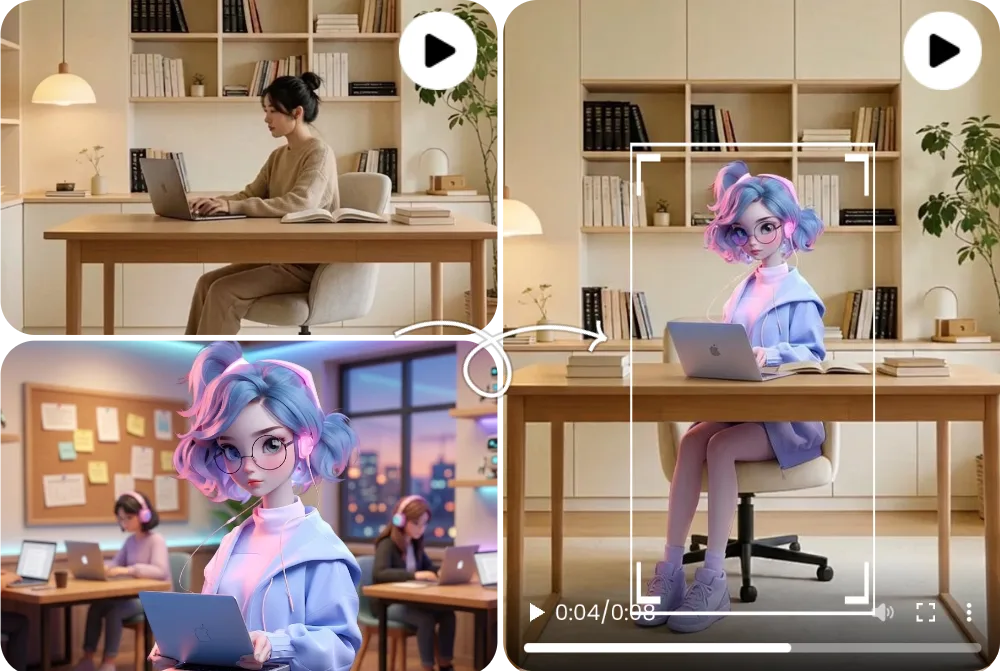
Before and After Character Replacement
A before-and-after character replacement example compares the source clip, replacement character image, and generated output side by side.
Character Replacement AI
تبديل الشخصية في الفيديو يستبدل الشخص أو الأفاتار أو الماسكوت الظاهر داخل فيديو موجود، مع الحفاظ على الحركة والكاميرا والإضاءة وتوقيت المشهد. يعمل FluxMov بأفضل شكل مع فيديو مصدر واضح وصورة شخصية بديلة عالية الجودة.
غيّر الشخصية الظاهرة في فيديو موجود دون إعادة تصوير المشهد.
استخدمه عندما تكون الحركة والكاميرا في الفيديو الأصلي مناسبة، لكنك تريد استبدال الشخصية الظاهرة بشخصية أو أفاتار أو ماسكوت جديد.
آخر تحديث:
تبديل الشخصية في الفيديو هو سير عمل يغيّر الموضوع المرئي في مقطع موجود مع الحفاظ على بنية المشهد.
| مقارنة | ما يعنيه |
|---|---|
| أكثر من face swap | لا يقتصر على الوجه؛ يمكنه دعم حضور الجسم والملابس والهوية داخل المشهد. |
| الفيديو يحدد الحركة | الفيديو المصدر يحدد التوقيت والحركة والكاميرا، والصورة تحدد الشخصية الجديدة. |
| متى تختاره بدل Motion Transfer؟ | اختره عندما يكون لديك فيديو كامل تريد الحفاظ عليه مع تغيير الشخصية فقط. |
| يحافظ على بنية المشهد | الفيديو المصدر يبقى مرجعًا للحركة والكاميرا والإضاءة، لذلك لا تبدأ من مشهد فارغ. |
| مراجعة الحواف واليدين | الصفحة تذكّر المستخدم بفحص مناطق التشوه الشائعة بدل الاكتفاء بوجه الشخصية. |
| اختبار قصير قبل الإنتاج | ابدأ بمقطع قصير قبل تحرير إعلان أو فيديو أطول حتى تتأكد من ثبات الشخصية. |
Prepare the right files, choose the right model, generate, and review the result before publishing.
اختر مقطعًا قصيرًا بحركة وكاميرا وإضاءة تريد الحفاظ عليها.
استخدم صورة واضحة للوجه والجسم أو السمات المهمة.
حدد الملابس والإضاءة والخلفية والعناصر التي يجب عدم تغييرها.
ابدأ بإعدادات خفيفة ثم ارفع الجودة عند ثبات النتيجة.
افحص اليدين والحواف والحجب واتساق الشخصية والإضاءة.
ضع النسخة الجديدة بجانب المصدر لفحص الحركة والإضاءة وتوقيت الكاميرا.
إذا ظهرت حواف أو هوية ضعيفة، استخدم صورة بديلة أوضح وبزاوية أقرب.
دوّن النموذج والمدة والوصف حتى يمكن تكرار النتيجة لحملة كاملة.
Wan 2.2, Kling 2.6, and Kling 3.0 support different replacement goals. Pick the model that matches the quality bar, review stage, and credit budget for the shot.
| قارن | Wan 2.2 | Kling 2.6 | Kling 3.0 |
|---|---|---|---|
| الفرق الأساسي | A lighter path for simple replace character in video AI tests when the source action is not too complex. | A balanced motion-control option for preserving source movement while keeping credit use lower than Kling 3.0. | The stronger AI character swap video choice when identity stability, gesture detail, and motion quality matter most. |
| الأفضل لـ | Early drafts, low-risk social concepts, quick mascot or avatar checks, and budget-conscious experiments. | Short creator clips, source-video swaps, dialogue concepts, and practical review rounds. | Client-facing edits, close-up character shots, dance or action clips, and final passes where fewer artifacts matter. |
| نمط التكلفة | Lowest relative cost; useful when you need more attempts before committing to a higher-quality pass. | Medium cost; in FluxMov Motion Control it uses fewer credits per second than Kling 3.0 at the same resolution. | Highest relative cost; choose it when quality and fewer failed retries are worth the extra credits. |
A practical workflow is to explore the idea with Wan 2.2, use Kling 2.6 for a credit-conscious motion-control pass, and reserve Kling 3.0 for demanding replacement shots.
Better source files create better outputs. Use this checklist before running a replace character in video AI generation.
مقطع قصير بموضوع رئيسي واضح وحجب قليل وحركة مفهومة.
صورة عالية الدقة تظهر الوجه أو الجسم أو العناصر المميزة.
استخدمه لتحديد ما يجب الحفاظ عليه أو تفاديه في المشهد.
اختَر صورة بديلة بزاوية قريبة من الفيديو المصدر عندما يكون ذلك ممكنًا.
الفيديو المصدر بإضاءة مستقرة يعطي نتيجة أسهل من لقطات فيها تغيرات حادة.
لا تستبدل شخصًا حقيقيًا أو علامة تجارية دون إذن واضح للاستخدام.
FluxMov is designed for controllable AI video workflows, not vague one-click promises. The page helps you understand what to upload, which model to choose, and how to improve results when a replacement fails.
FluxMov supports broader AI character swap video workflows where body shape, outfit, motion, and scene fit matter.
The source clip remains the motion reference, helping the final video keep timing, camera flow, expressions, lighting, and composition.
Draft with Wan 2.2, balance quality and credits with Kling 2.6, and use Kling 3.0 for demanding shots that need stronger identity and motion stability.
Use FluxMov for creator remixes, virtual influencers, brand mascots, anime-style characters, and previsualization scenes.
These examples show what a strong character replacement result looks like before you generate your own video. Compare the source video, replacement character, and final output to judge motion preservation and identity consistency.
A before-and-after character replacement example compares the source clip, replacement character image, and generated output side by side.
A full-body replacement example shows how the generated video changes more than the face, including body shape, outfit, pose, and silhouette.
An avatar or mascot video example shows a stylized character inserted into a scene while preserving camera framing, lighting, and movement rhythm.
Answers to the most important questions before you replace a character in video with AI.
لا. face swap يغير الوجه غالبًا، بينما Character Replacement AI يركز على الشخصية الظاهرة داخل المشهد بالكامل.
مقطع قصير بموضوع واحد وإضاءة مستقرة وحجب قليل يعطي أفضل نتيجة للمراجعة.
صورة الوجه والجسم تساعد عندما يظهر الجسم في الفيديو، أما اللقطة القريبة فتحتاج وجهًا واضحًا أكثر.
استخدم Motion Transfer عندما لا تريد الحفاظ على فيديو كامل، بل تريد نقل الحركة إلى صورة جديدة.
اختر فيديو مصدرًا بحجب أقل، وصورة بديلة واضحة، وابدأ بمقطع قصير للمراجعة.
نعم، لكن تأكد من حقوق الشخصيات والمنتجات والعلامات قبل النشر التجاري.
الهدف هو الحفاظ على الخلفية والمشهد قدر الإمكان، لكن يجب فحص النتيجة قبل النشر.
استكشف workflows قريبة مع الحفاظ على مسار إنشاء الفيديو المعتمد على المراجع.
Create the edit
Ready to replace a character in video AI without reshooting the scene? Upload a source clip, add your replacement character, and generate a controlled character replacement video with FluxMov. يمكنك إنشاء أول اختبار عام مجانًا.
أنشئ مجانًا