
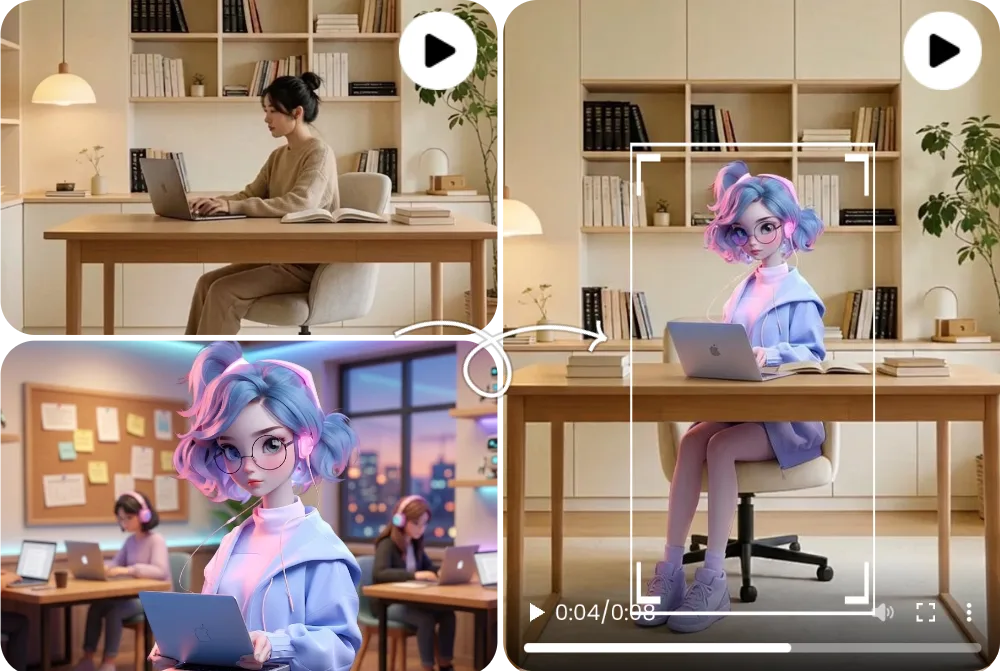
Before and After Character Replacement
A before-and-after character replacement example compares the source clip, replacement character image, and generated output side by side.
動画キャラクター差し替えAI
AIキャラクタースワップ動画は、既存動画の動き、カメラ、照明、シーン構造を保ちながら、表示される人物、アバター、マスコット、キャラクターを置き換えるワークフローです。FluxMov は、明確な元動画と読み取りやすい差し替えキャラクター画像で最も確認しやすくなります。
撮り直しなしで、動画に登場するキャラクターを別の人物、アバター、マスコット、スタイル化された被写体に差し替えます。
元動画の動きやカメラは良いが、表示されるキャラクターだけ変えたい場合に使います。元動画は動き、表情、照明、カメラを決め、差し替え画像は最終的に登場するキャラクターを定義します。
最終更新:
AIキャラクタースワップ動画は、既存クリップ内の見える被写体を変更し、元動画の動きとシーン構造を維持する動画ワークフローです。
| 比較 | 意味 |
|---|---|
| AIキャラクタースワップ動画 vs face swap | Face swap は顔の置き換えが中心です。キャラクター差し替えAI は、全身、衣装、存在感、マスコットやスタイル化された被写体まで扱うため、シーン全体を保ちたい場合に向きます。 |
| キャラ入れ替え AI動画の入力 | 元動画は動きとシーンを決め、差し替え画像は新しいキャラクターの見た目を決めます。角度、照明、身体の見え方が近いほど安定しやすくなります。 |
| Motion Transfer との違い | 既存動画の中のキャラクターを変えるなら Replace Character、別の画像を参照動画の動きで動かすなら Motion Transfer が向いています。 |
適切な素材を準備し、モデルを選び、生成後に公開前レビューを行います。
維持したい動き、カメラ、照明、シーンの流れを含むクリップを選びます。
挿入したい人物、アバター、マスコット、キャラクター画像をアップロードします。
衣装、識別要素、背景の保持、照明、変えたくない部分を短く指定します。
コンセプト確認は軽い設定から始め、安定性が必要な場合はより高品質な設定へ進みます。
手、輪郭、隠れ、照明、アイデンティティの一貫性を公開前に確認します。
Wan 2.2, Kling 2.6, and Kling 3.0 support different replacement goals. Pick the model that matches the quality bar, review stage, and credit budget for the shot.
| 比較 | Wan 2.2 | Kling 2.6 | Kling 3.0 |
|---|---|---|---|
| 主な違い | A lighter path for simple replace character in video AI tests when the source action is not too complex. | A balanced motion-control option for preserving source movement while keeping credit use lower than Kling 3.0. | The stronger AI character swap video choice when identity stability, gesture detail, and motion quality matter most. |
| 最適な用途 | Early drafts, low-risk social concepts, quick mascot or avatar checks, and budget-conscious experiments. | Short creator clips, source-video swaps, dialogue concepts, and practical review rounds. | Client-facing edits, close-up character shots, dance or action clips, and final passes where fewer artifacts matter. |
| コスト傾向 | Lowest relative cost; useful when you need more attempts before committing to a higher-quality pass. | Medium cost; in FluxMov Motion Control it uses fewer credits per second than Kling 3.0 at the same resolution. | Highest relative cost; choose it when quality and fewer failed retries are worth the extra credits. |
A practical workflow is to explore the idea with Wan 2.2, use Kling 2.6 for a credit-conscious motion-control pass, and reserve Kling 3.0 for demanding replacement shots.
良い素材ほど結果を確認しやすくなります。生成前のチェックリストとして使ってください。
主キャラクターが明確な5〜10秒程度の動画を使います。強いブレ、隠れ、複数人物の重なりは避けます。
顔、衣装、シルエット、識別要素が読み取りやすい高解像度画像を使います。
素材にない情報だけを補足し、カメラ角度、背景、照明、衣装、保持したい要素を明確にします。
速いカット、強い blur、低解像度入力、混雑したシーン、角度の不一致、被写体の遮蔽は replacement を不安定にします。長い編集は scene-level clips に分けてからつなぎ合わせてください。
FluxMov は曖昧なワンクリックではなく、制御しやすい AI動画ワークフローのために設計されています。
FluxMov supports broader AI character swap video workflows where body shape, outfit, motion, and scene fit matter.
The source clip remains the motion reference, helping the final video keep timing, camera flow, expressions, lighting, and composition.
Draft with Wan 2.2, balance quality and credits with Kling 2.6, and use Kling 3.0 for demanding shots that need stronger identity and motion stability.
Use FluxMov for creator remixes, virtual influencers, brand mascots, anime-style characters, and previsualization scenes.
These examples show what a strong character replacement result looks like before you generate your own video. Compare the source video, replacement character, and final output to judge motion preservation and identity consistency.
A before-and-after character replacement example compares the source clip, replacement character image, and generated output side by side.
A full-body replacement example shows how the generated video changes more than the face, including body shape, outfit, pose, and silhouette.
An avatar or mascot video example shows a stylized character inserted into a scene while preserving camera framing, lighting, and movement rhythm.
AIで動画のキャラクターを差し替える前に確認したい質問です。
source video をアップロードし、replacement character image を追加し、必要なら prompt guidance を書き、model を選んで生成します。FluxMov は source clip を使って motion、expressions、lighting、camera flow を保ちながら、visible character を差し替えます。
いいえ。Face swap は通常、顔の identity だけを変えます。Character replacement AI は body presence、outfit、mascot identity、stylized characters、full-scene continuity を含む、より広い video character replacement を支援できます。
入力が明確なら可能です。Full-body replacement は、source subject が見えていて強く遮られておらず、replacement character image に clear silhouette、outfit、visual identity がある場合に最も安定します。
1人の main character、安定した lighting、明確な body shape、少ない motion blur を持つ短い clip を使います。最初のテストでは、混雑したシーン、速いカット、強い occlusion、低解像度 footage を避けてください。
flicker は、lighting の不一致、速い movement、occlusion、低解像度入力、source angle に合わない replacement image から起きることが多いです。短い clip、clean lighting、より sharp な character image を試してください。
はい。FluxMov は realistic people、avatars、mascots、anime-style characters、stylized artwork を支援できます。重要なのは visual clarity です。character image には認識しやすい identity と、motion に耐えられる十分な detail が必要です。
source video、replacement character、likeness、関連する brand assets を使う許可が必要です。商用利用では、公開前に地域ルール、platform policies、plan terms を確認してください。
最初のテストではおすすめしません。短い clips の方が確認と調整がしやすいです。長い編集が必要な場合は、似た lighting と camera framing の scene に分割し、同じ replacement image を使い、各 segment をレビューしてから最終動画につなげてください。
すでに source video があり、その clip 内の visible character を差し替えたい場合は Character Replacement AI を使います。別の movement reference から新しい character や image を動かしたい場合は Motion Transfer を使います。
参照素材で導く動画制作の流れを保ちながら、近いワークフローを比較できます。
編集を作成
撮り直しなしでキャラクターを差し替える準備はできましたか?元動画と差し替え画像を追加し、FluxMov で制御しやすい編集を生成できます。 最初の公開テストは無料生成できます。
無料で生成