
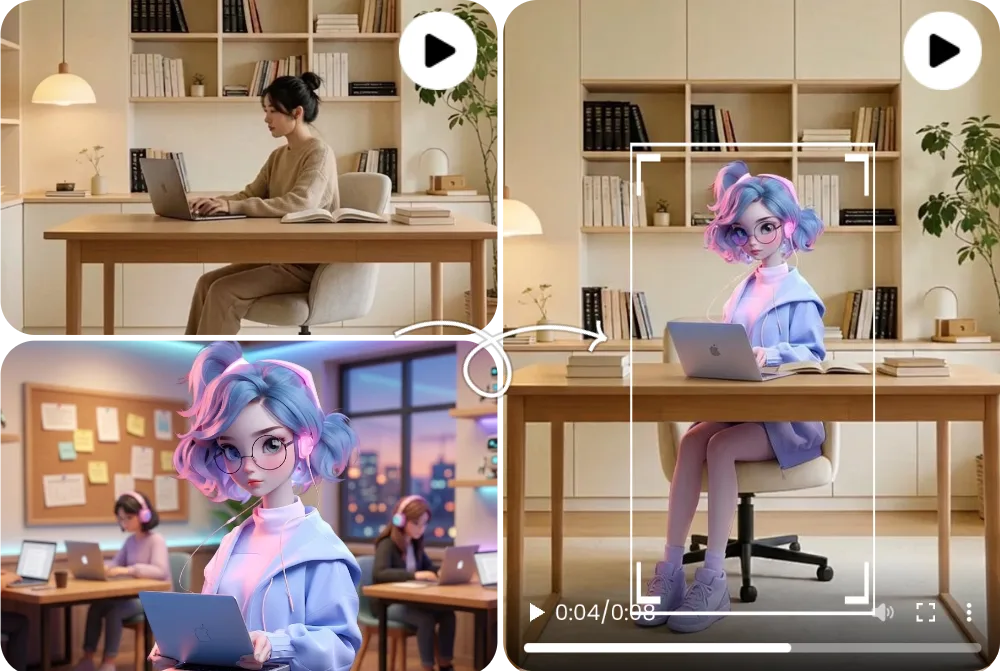
Before and After Character Replacement
A before-and-after character replacement example compares the source clip, replacement character image, and generated output side by side.
비디오 캐릭터 교체 AI
AI 캐릭터 스왑 비디오은 기존 비디오의 움직임, 카메라, 조명, 장면 구조를 유지하면서 표시되는 인물, 아바타, 마스코트, 캐릭터를 대체하는 워크플로입니다. FluxMov는 명확한 원본 비디오과 읽기 쉬운 교체 캐릭터 이미지로 가장 쉽게 확인할 수 있습니다.
다시 찍지 않고 비디오에 등장하는 캐릭터를 다른 사람, 아바타, 마스코트, 스타일링된 피사체로 바꿉니다.
원래 비디오의 움직임이나 카메라는 좋지만, 표시되는 캐릭터만 바꾸고 싶은 경우에 사용합니다. 원래 비디오은 움직임, 표정, 조명, 카메라를 결정하고, 교체 이미지는 궁극적으로 등장하는 캐릭터를 정의합니다.
최종 업데이트:
AI 캐릭터 스왑 비디오은 기존 클립에서 보이는 피사체를 변경하고 원본 비디오의 움직임과 장면 구조를 유지하는 비디오 워크플로입니다.
| 비교 | 의미 |
|---|---|
| AI 캐릭터 스왑 비디오 vs face swap | 얼굴 스왑은 얼굴 대체가 중심입니다. 캐릭터 교체 AI는 전신, 의상, 존재감, 마스코트나 스타일화된 피사체까지 다루기 때문에, 장면 전체를 유지하고 싶은 경우를 향합니다. |
| 캐릭터 교체 AI 비디오 입력 | 원래 비디오은 움직임과 장면을 결정하고, 교체 이미지는 새로운 캐릭터의 외형을 결정합니다. 각도, 조명, 신체의 보이는 방법이 가까울수록 안정되고 쉬워집니다. |
| Motion Transfer와의 차이 | 기존 비디오 안의 캐릭터를 바꾸면 Replace Character, 다른 이미지를 참조 비디오의 움직임으로 움직이면 Motion Transfer가 향하고 있습니다. |
올바른 파일을 준비하고 모델을 선택한 뒤, 생성 결과를 게시 전에 검토하세요.
유지하려는 움직임, 카메라, 조명, 장면 흐름이 포함된 클립을 선택합니다.
삽입하려는 사람, 아바타, 마스코트, 캐릭터 이미지를 업로드합니다.
의상, 식별 요소, 배경 유지, 조명, 변경하지 않으려는 부분을 짧게 지정합니다.
컨셉 확인은 가벼운 설정으로 시작하고 안정성이 필요한 경우는 보다 고품질의 설정으로 진행합니다.
손, 윤곽, 숨김, 조명, 정체성의 일관성을 공개하기 전에 확인합니다.
Wan 2.2, Kling 2.6, and Kling 3.0 support different replacement goals. Pick the model that matches the quality bar, review stage, and credit budget for the shot.
| 비교 | Wan 2.2 | Kling 2.6 | Kling 3.0 |
|---|---|---|---|
| 핵심 차이 | A lighter path for simple replace character in video AI tests when the source action is not too complex. | A balanced motion-control option for preserving source movement while keeping credit use lower than Kling 3.0. | The stronger AI character swap video choice when identity stability, gesture detail, and motion quality matter most. |
| 적합한 용도 | Early drafts, low-risk social concepts, quick mascot or avatar checks, and budget-conscious experiments. | Short creator clips, source-video swaps, dialogue concepts, and practical review rounds. | Client-facing edits, close-up character shots, dance or action clips, and final passes where fewer artifacts matter. |
| 비용 특성 | Lowest relative cost; useful when you need more attempts before committing to a higher-quality pass. | Medium cost; in FluxMov Motion Control it uses fewer credits per second than Kling 3.0 at the same resolution. | Highest relative cost; choose it when quality and fewer failed retries are worth the extra credits. |
A practical workflow is to explore the idea with Wan 2.2, use Kling 2.6 for a credit-conscious motion-control pass, and reserve Kling 3.0 for demanding replacement shots.
더 좋은 소스 파일이 더 좋은 결과를 만듭니다. 생성 전 체크리스트로 활용하세요.
주 캐릭터가 명확한 5~10초 정도의 비디오을 사용합니다. 강한 흔들림, 숨기기, 여러 사람의 겹침은 피합니다.
얼굴, 의상, 실루엣, 식별 요소가 읽기 쉬운 고해상도 이미지를 사용합니다.
소재에 없는 정보만 보충하여 카메라 각도, 배경, 조명, 의상, 유지하려는 요소를 명확히 합니다.
빠른 컷, 강한 blur, 저해상도 입력, 혼잡한 장면, 각도 불일치, 피사체 차폐는 replacement를 불안정하게 합니다. 긴 편집은 scene-level clips 로 나누고 나서 연결해 주세요.
FluxMov는 모호한 원클릭 약속이 아니라 제어 가능한 AI 비디오 워크플로를 위해 설계되었습니다.
FluxMov supports broader AI character swap video workflows where body shape, outfit, motion, and scene fit matter.
The source clip remains the motion reference, helping the final video keep timing, camera flow, expressions, lighting, and composition.
Draft with Wan 2.2, balance quality and credits with Kling 2.6, and use Kling 3.0 for demanding shots that need stronger identity and motion stability.
Use FluxMov for creator remixes, virtual influencers, brand mascots, anime-style characters, and previsualization scenes.
These examples show what a strong character replacement result looks like before you generate your own video. Compare the source video, replacement character, and final output to judge motion preservation and identity consistency.
A before-and-after character replacement example compares the source clip, replacement character image, and generated output side by side.
A full-body replacement example shows how the generated video changes more than the face, including body shape, outfit, pose, and silhouette.
An avatar or mascot video example shows a stylized character inserted into a scene while preserving camera framing, lighting, and movement rhythm.
AI로 비디오 캐릭터를 교체하기 전에 확인해야 할 핵심 질문입니다.
source video를 업로드하고, replacement character image를 추가하고, 필요하다면 prompt guidance를 작성하고, model을 선택하여 생성합니다. FluxMov는 source clip을 사용하여 motion, expresions, lighting, camera flow를 유지하면서 visible character를 교환합니다.
아니. Face swap은 일반적으로 얼굴의 identity만 변경합니다. Character replacement AI는 body presence, outfit, mascot identity, stylized characters, full-scene continuity를 포함한 보다 넓은 video character replacement를 지원할 수 있습니다.
입력이 명확하면 가능합니다. Full-body replacement 는, source subject 가 보이고 강하게 차단되어 있지 않고, replacement character image 에 clear silhouette, outfit, visual identity 가 있는 경우에 가장 안정합니다.
1명의 main character, 안정된 lighting, 명확한 body shape, 적은 motion blur 를 가지는 짧은 clip 를 사용합니다. 첫 번째 테스트에서는 혼잡한 장면, 빠른 컷, 강한 occlusion, 저해상도 footage를 피하십시오.
flicker는 lighting 불일치, 빠른 movement, occlusion, 저해상도 입력, source angle에 맞지 않는 replacement image에서 발생합니다. 짧은 clip, clean lighting, 보다 sharp인 character image 를 시험해 보세요.
네. FluxMov는 realistic people, avatars, mascots, anime-style characters, stylized artwork를 지원할 수 있습니다. 중요한 것은 visual clarity입니다. character image에는 인식하기 쉬운 identity와 motion에 견딜 수 있는 충분한 detail이 필요합니다.
source video, replacement character, likeness, 관련 brand assets를 사용할 권한이 필요합니다. 상업용으로 게시하기 전에 지역 규칙, 플랫폼 정책 및 계획 기간을 확인하십시오.
첫 번째 테스트에서는 권장하지 않습니다. 짧은 clips가 확인하고 조정하기 쉽습니다. 긴 편집이 필요한 경우 비슷한 lighting과 camera framing의 장면으로 나누고 동일한 replacement image를 사용하여 각 segment를 검토한 다음 최종 비디오으로 연결합니다.
이미 source video가 있고 clip의 visible character를 바꾸고 싶다면 Character Replacement AI를 사용하십시오. 다른 movement reference 로부터 새로운 character 나 image 를 움직이고 싶은 경우는 Motion Transfer 를 사용합니다.
동일한 참조 기반 비디오 제작 흐름을 유지하면서 가까운 워크플로를 살펴보세요.
편집 만들기
다시 촬영하지 않고 캐릭터를 교체할 준비가 되었나요? 소스 클립과 교체 캐릭터를 업로드해 FluxMov에서 제어 가능한 캐릭터 스왑 비디오를 생성하세요. 첫 공개 테스트는 무료로 생성할 수 있습니다.
무료 생성