
module goal
यह बताता है कि user को Image to Video शुरू करने से पहले क्या समझना चाहिए।
AI इमेज टू वीडियो जनरेटर
त्वरित उत्तर
FluxMov एक image को animated clip में बदलता है। Image upload करें, movement और camera लिखें, फिर duration, ratio और resolution चुनें।
Visual workflow
ये वही visual explanation modules हैं जो source page में हैं, ताकि user generation से पहले workflow boundaries समझ सके।
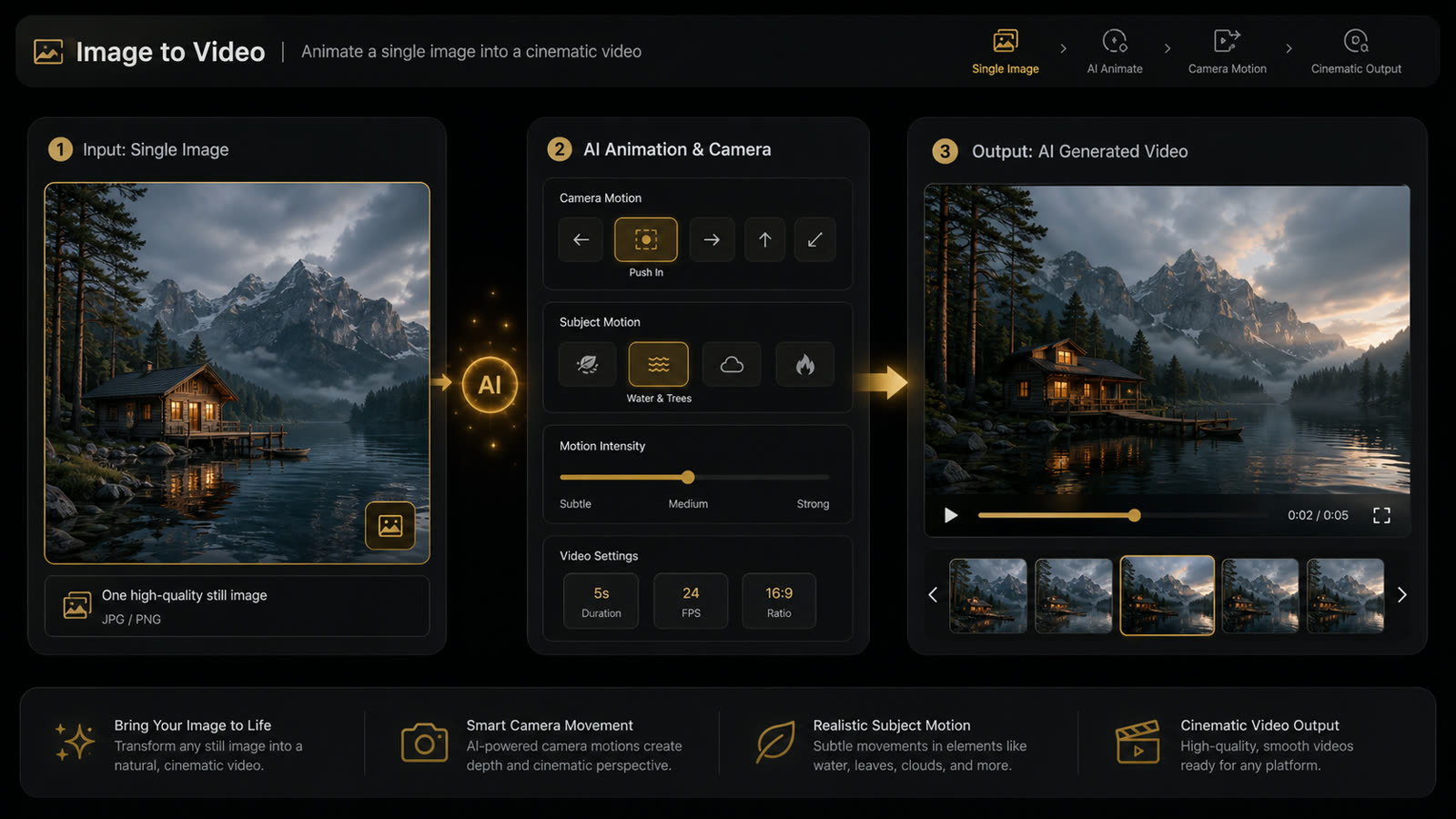
Image to Video एक source image से शुरू करके camera movement, subject motion, atmosphere या animation जोड़ता है।
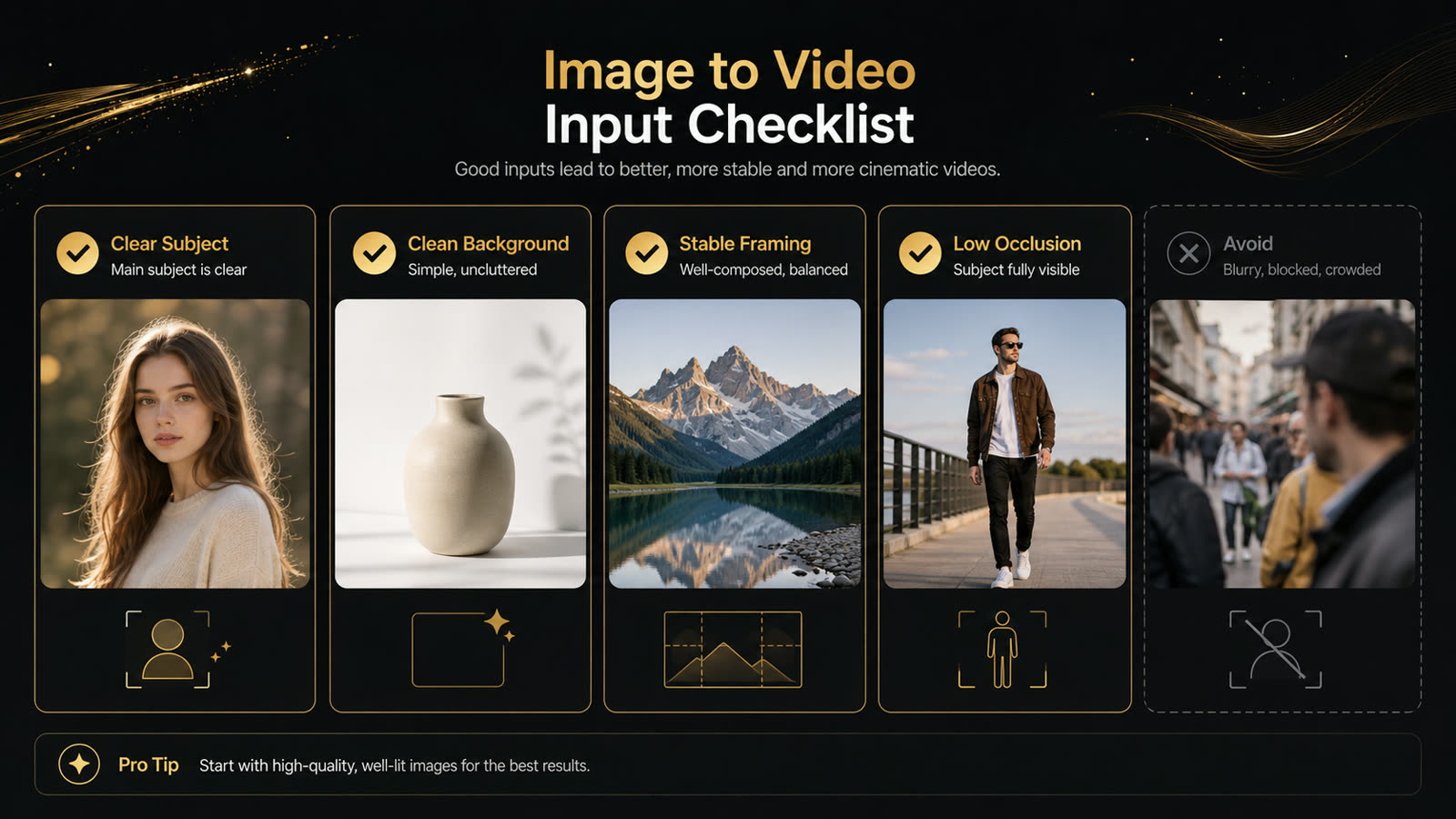
Clear subject, stable framing, clean background और कम occlusion model को मजबूत visual anchor देते हैं।
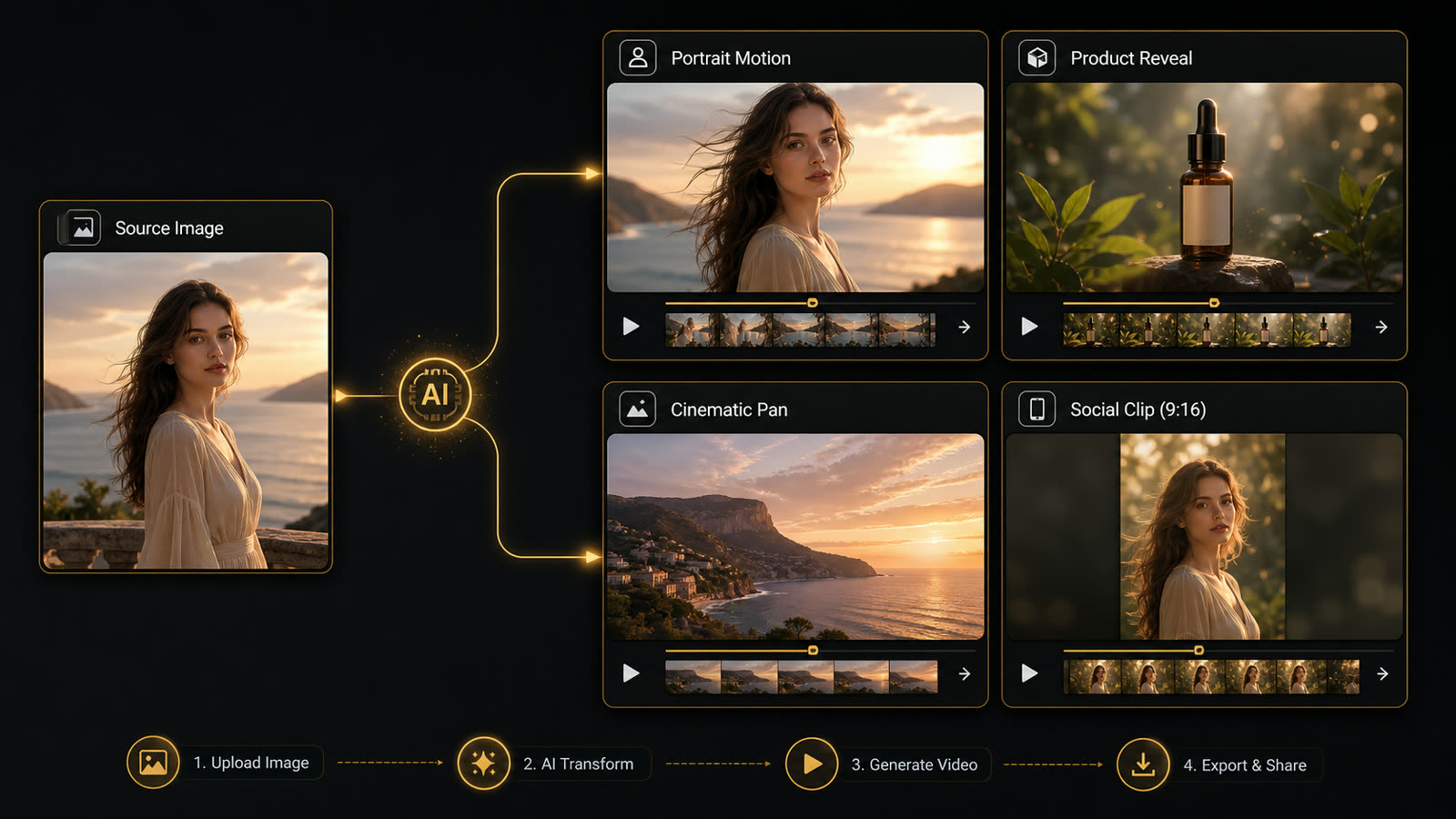
Same source image से portrait motion, product reveal, cinematic pan, social hook और concept preview बनाए जा सकते हैं।
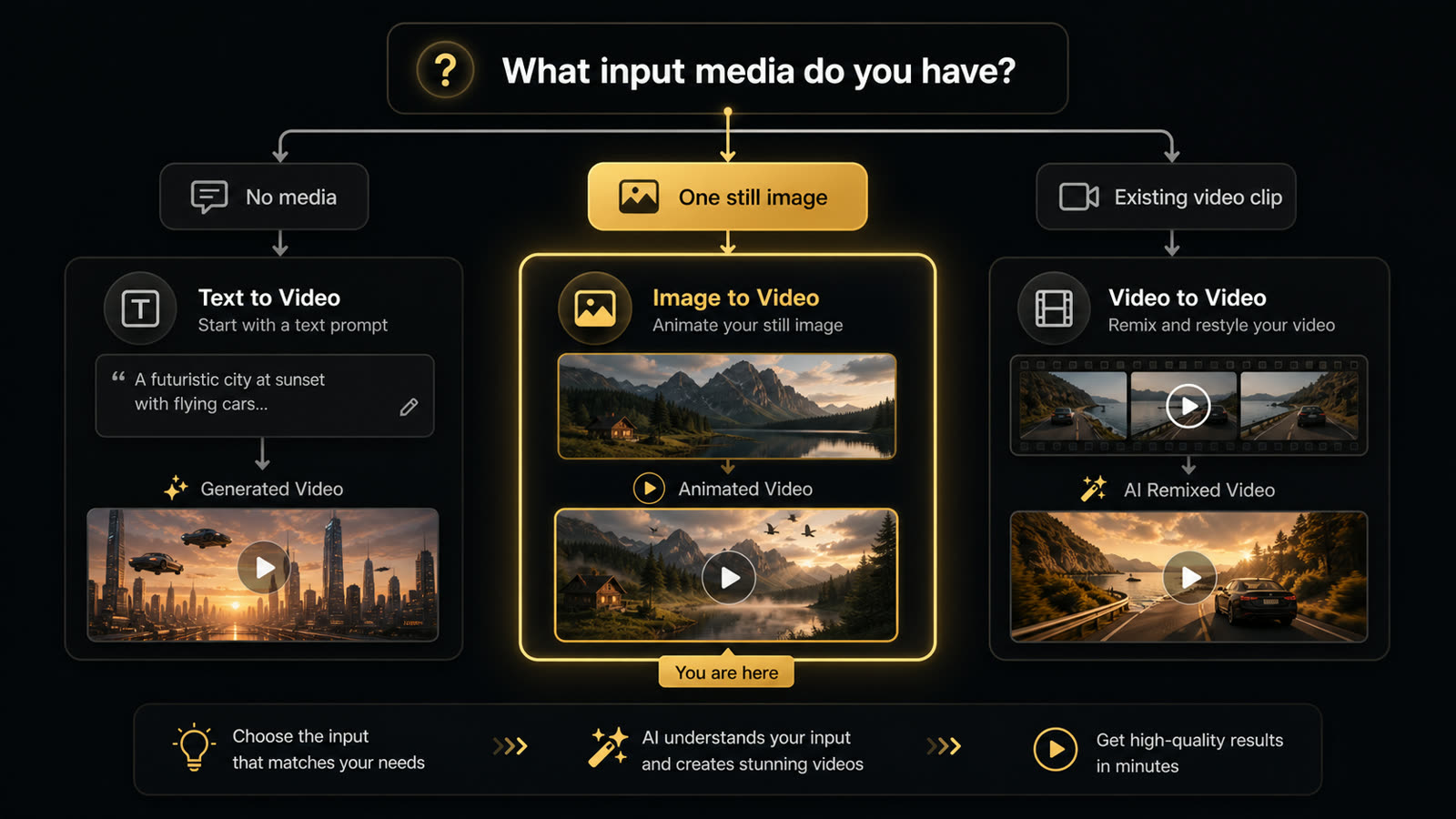
Still image हो तो Image to Video, media न हो तो Text to Video, और source clip हो तो Video to Video चुनें।
| इनपुट | ज़रूरत | क्यों |
|---|---|---|
| source image | JPG, PNG या WebP, 10MB तक, clear main subject और readable edges के साथ। | Clean image model को stable visual anchor देती है। |
| motion prompt | 20 से 60 शब्दों में एक movement, एक camera move और clear style लिखें। | Focused instruction distortion और extra movement कम करता है। |
| output | social clips के लिए 9:16, web के लिए 16:9 और feed/ad placements के लिए 1:1 चुनें। | सही frame clip को publish-ready बनाता है। |
यह section source page के Image to Video module को Hindi में रखता है, ताकि page केवल छोटा summary न रह जाए।
यह बताता है कि user को Image to Video शुरू करने से पहले क्या समझना चाहिए।
Files, prompt, output settings और credit planning को साथ में explain किया गया है।
First draft के बाद किन चीजों को inspect करना है, यह साफ किया गया है।
अगर inputs इस tool के लिए fit नहीं हैं, तो adjacent workflow की ओर guide करता है।
यह section source page के Image to Video module को Hindi में रखता है, ताकि page केवल छोटा summary न रह जाए।
यह बताता है कि user को Image to Video शुरू करने से पहले क्या समझना चाहिए।
Files, prompt, output settings और credit planning को साथ में explain किया गया है।
First draft के बाद किन चीजों को inspect करना है, यह साफ किया गया है।
अगर inputs इस tool के लिए fit नहीं हैं, तो adjacent workflow की ओर guide करता है।
यह section source page के Image to Video module को Hindi में रखता है, ताकि page केवल छोटा summary न रह जाए।
यह बताता है कि user को Image to Video शुरू करने से पहले क्या समझना चाहिए।
Files, prompt, output settings और credit planning को साथ में explain किया गया है।
First draft के बाद किन चीजों को inspect करना है, यह साफ किया गया है।
अगर inputs इस tool के लिए fit नहीं हैं, तो adjacent workflow की ओर guide करता है।
यह section source page के Image to Video module को Hindi में रखता है, ताकि page केवल छोटा summary न रह जाए।
यह बताता है कि user को Image to Video शुरू करने से पहले क्या समझना चाहिए।
Files, prompt, output settings और credit planning को साथ में explain किया गया है।
First draft के बाद किन चीजों को inspect करना है, यह साफ किया गया है।
अगर inputs इस tool के लिए fit नहीं हैं, तो adjacent workflow की ओर guide करता है।
यह section source page के Image to Video module को Hindi में रखता है, ताकि page केवल छोटा summary न रह जाए।
यह बताता है कि user को Image to Video शुरू करने से पहले क्या समझना चाहिए।
Files, prompt, output settings और credit planning को साथ में explain किया गया है।
First draft के बाद किन चीजों को inspect करना है, यह साफ किया गया है।
अगर inputs इस tool के लिए fit नहीं हैं, तो adjacent workflow की ओर guide करता है।
यह section source page के Image to Video module को Hindi में रखता है, ताकि page केवल छोटा summary न रह जाए।
यह बताता है कि user को Image to Video शुरू करने से पहले क्या समझना चाहिए।
Files, prompt, output settings और credit planning को साथ में explain किया गया है।
First draft के बाद किन चीजों को inspect करना है, यह साफ किया गया है।
अगर inputs इस tool के लिए fit नहीं हैं, तो adjacent workflow की ओर guide करता है।
यह section source page के Image to Video module को Hindi में रखता है, ताकि page केवल छोटा summary न रह जाए।
यह बताता है कि user को Image to Video शुरू करने से पहले क्या समझना चाहिए।
Files, prompt, output settings और credit planning को साथ में explain किया गया है।
First draft के बाद किन चीजों को inspect करना है, यह साफ किया गया है।
अगर inputs इस tool के लिए fit नहीं हैं, तो adjacent workflow की ओर guide करता है।
यह section source page के Image to Video module को Hindi में रखता है, ताकि page केवल छोटा summary न रह जाए।
यह बताता है कि user को Image to Video शुरू करने से पहले क्या समझना चाहिए।
Files, prompt, output settings और credit planning को साथ में explain किया गया है।
First draft के बाद किन चीजों को inspect करना है, यह साफ किया गया है।
अगर inputs इस tool के लिए fit नहीं हैं, तो adjacent workflow की ओर guide करता है।
यह section source page के Image to Video module को Hindi में रखता है, ताकि page केवल छोटा summary न रह जाए।
यह बताता है कि user को Image to Video शुरू करने से पहले क्या समझना चाहिए।
Files, prompt, output settings और credit planning को साथ में explain किया गया है।
First draft के बाद किन चीजों को inspect करना है, यह साफ किया गया है।
अगर inputs इस tool के लिए fit नहीं हैं, तो adjacent workflow की ओर guide करता है।
यह section source page के Image to Video module को Hindi में रखता है, ताकि page केवल छोटा summary न रह जाए।
यह बताता है कि user को Image to Video शुरू करने से पहले क्या समझना चाहिए।
Files, prompt, output settings और credit planning को साथ में explain किया गया है।
First draft के बाद किन चीजों को inspect करना है, यह साफ किया गया है।
अगर inputs इस tool के लिए fit नहीं हैं, तो adjacent workflow की ओर guide करता है।
यह section source page के Image to Video module को Hindi में रखता है, ताकि page केवल छोटा summary न रह जाए।
यह बताता है कि user को Image to Video शुरू करने से पहले क्या समझना चाहिए।
Files, prompt, output settings और credit planning को साथ में explain किया गया है।
First draft के बाद किन चीजों को inspect करना है, यह साफ किया गया है।
अगर inputs इस tool के लिए fit नहीं हैं, तो adjacent workflow की ओर guide करता है।
यह table source page की comparison या requirements layer को Hindi में रखता है।
| मॉड्यूल | क्या जोड़ता है | कब review करें |
|---|---|---|
| inputs | clear file और specific prompt | generation से पहले |
| settings | ratio, duration, resolution और audio | credits estimate से पहले |
| review | identity, motion और edges | first draft के बाद |
| limits | occlusion, rights और long clips | publish से पहले |
| next step | जरूरत हो तो adjacent workflow | result review के बाद |
यह table source page की comparison या requirements layer को Hindi में रखता है।
| मॉड्यूल | क्या जोड़ता है | कब review करें |
|---|---|---|
| inputs | clear file और specific prompt | generation से पहले |
| settings | ratio, duration, resolution और audio | credits estimate से पहले |
| review | identity, motion और edges | first draft के बाद |
| limits | occlusion, rights और long clips | publish से पहले |
| next step | जरूरत हो तो adjacent workflow | result review के बाद |
यह table source page की comparison या requirements layer को Hindi में रखता है।
| मॉड्यूल | क्या जोड़ता है | कब review करें |
|---|---|---|
| inputs | clear file और specific prompt | generation से पहले |
| settings | ratio, duration, resolution और audio | credits estimate से पहले |
| review | identity, motion और edges | first draft के बाद |
| limits | occlusion, rights और long clips | publish से पहले |
| next step | जरूरत हो तो adjacent workflow | result review के बाद |