
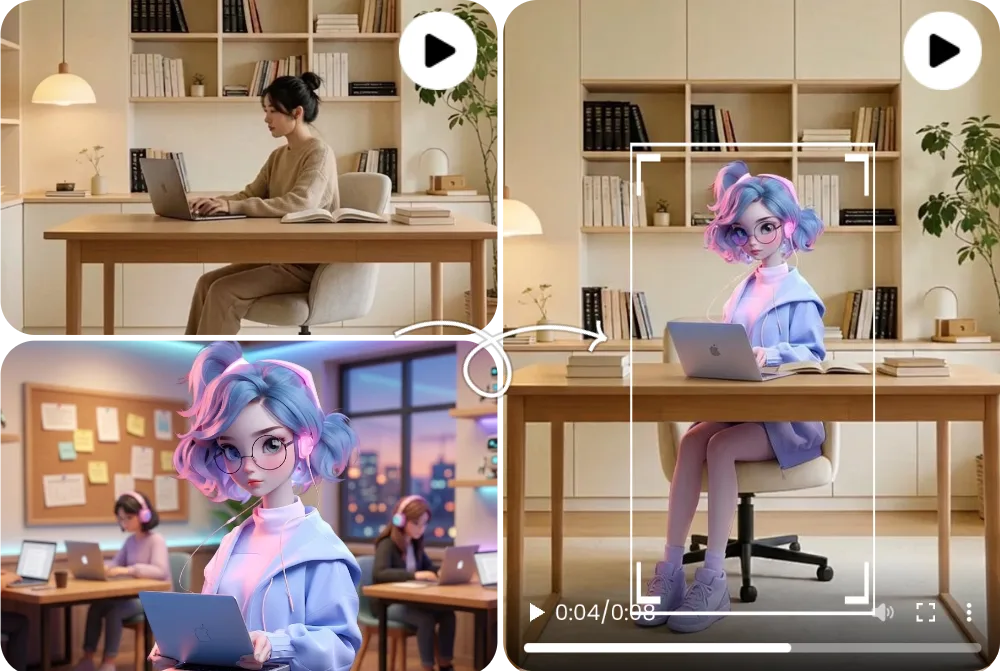
Before and After Character Replacement
A before-and-after character replacement example compares the source clip, replacement character image, and generated output side by side.
Character Replacement AI
AI कैरेक्टर स्वैप वीडियो किसी existing video में दिख रहे person, avatar या mascot को बदलता है, जबकि motion, camera, lighting और scene timing preserve करता है। FluxMov clear source video और high-quality replacement character image के साथ best काम करता है।
Existing video का scene दोबारा shoot किए बिना character बदलें।
जब original video की motion और camera सही है, लेकिन दिख रहे character को new person, avatar या mascot से बदलना है, तब यह workflow उपयोग करें।
Last updated:
AI character replacement ऐसा workflow है जो existing clip में visible subject बदलता है और scene structure बनाए रखता है।
| Comparison | इसका मतलब |
|---|---|
| Face swap से आगे | यह सिर्फ face नहीं बदलता; body presence, outfit और scene identity को भी support कर सकता है। |
| Video movement तय करता है | Source video timing, motion और camera define करता है; image new character define करती है। |
| Motion Transfer के बजाय कब? | जब आपके पास पूरा video है जिसे preserve करते हुए सिर्फ character बदलना है। |
| Scene structure preserve करें | Source video movement, camera और lighting anchor करता है, इसलिए blank scene से शुरू नहीं करना पड़ता। |
| Edges और hands review | Page user को common distortion areas inspect करने के लिए याद दिलाता है। |
| Short test first | Ad या long edit बनाने से पहले short clip में character stability confirm करें। |
Prepare the right files, choose the right model, generate, and review the result before publishing.
ऐसा short clip चुनें जिसकी motion, camera और lighting preserve करनी है।
face, body या important visual traits दिखाने वाली clear image उपयोग करें।
outfit, lighting, background और किन चीजों को न बदलना है वह लिखें।
पहले light settings से शुरू करें, फिर result stable होने पर quality बढ़ाएं।
hands, edges, occlusion, identity consistency और lighting जांचें।
New version को source के साथ रखकर motion, lighting और camera timing check करें।
Edges या identity weak हों तो closer angle और clearer image use करें।
Model, duration और prompt note करें ताकि campaign में same result repeat हो।
Wan 2.2, Kling 2.6, and Kling 3.0 support different replacement goals. Pick the model that matches the quality bar, review stage, and credit budget for the shot.
| Compare | Wan 2.2 | Kling 2.6 | Kling 3.0 |
|---|---|---|---|
| मुख्य फर्क | A lighter path for simple replace character in video AI tests when the source action is not too complex. | A balanced motion-control option for preserving source movement while keeping credit use lower than Kling 3.0. | The stronger AI character swap video choice when identity stability, gesture detail, and motion quality matter most. |
| Best for | Early drafts, low-risk social concepts, quick mascot or avatar checks, and budget-conscious experiments. | Short creator clips, source-video swaps, dialogue concepts, and practical review rounds. | Client-facing edits, close-up character shots, dance or action clips, and final passes where fewer artifacts matter. |
| Cost profile | Lowest relative cost; useful when you need more attempts before committing to a higher-quality pass. | Medium cost; in FluxMov Motion Control it uses fewer credits per second than Kling 3.0 at the same resolution. | Highest relative cost; choose it when quality and fewer failed retries are worth the extra credits. |
A practical workflow is to explore the idea with Wan 2.2, use Kling 2.6 for a credit-conscious motion-control pass, and reserve Kling 3.0 for demanding replacement shots.
Better source files create better outputs. Use this checklist before running a replace character in video AI generation.
short clip, clear main subject, low occlusion और understandable movement।
high-resolution image जिसमें face, body या key traits साफ दिखें।
scene में क्या preserve या avoid करना है, इसे define करने के लिए उपयोग करें।
Possible हो तो source video से मिलती-जुलती angle वाली replacement image चुनें।
Stable source lighting, fast flicker या harsh changes की तुलना में easier review देती है।
किसी real person या brand character को clear permission के बिना replace न करें।
FluxMov is designed for controllable AI video workflows, not vague one-click promises. The page helps you understand what to upload, which model to choose, and how to improve results when a replacement fails.
FluxMov supports broader AI character swap video workflows where body shape, outfit, motion, and scene fit matter.
The source clip remains the motion reference, helping the final video keep timing, camera flow, expressions, lighting, and composition.
Draft with Wan 2.2, balance quality and credits with Kling 2.6, and use Kling 3.0 for demanding shots that need stronger identity and motion stability.
Use FluxMov for creator remixes, virtual influencers, brand mascots, anime-style characters, and previsualization scenes.
These examples show what a strong character replacement result looks like before you generate your own video. Compare the source video, replacement character, and final output to judge motion preservation and identity consistency.
A before-and-after character replacement example compares the source clip, replacement character image, and generated output side by side.
A full-body replacement example shows how the generated video changes more than the face, including body shape, outfit, pose, and silhouette.
An avatar or mascot video example shows a stylized character inserted into a scene while preserving camera framing, lighting, and movement rhythm.
Answers to the most important questions before you replace a character in video with AI.
नहीं। face swap अधिकतर face बदलता है, जबकि Character Replacement AI visible character को पूरे scene context में बदलने पर focus करता है।
एक main subject, stable lighting और कम occlusion वाला short clip best reviewable result देता है।
अगर body video में दिखती है तो full body helpful है; close-up में clear face ज्यादा important है।
जब पूरा source video preserve नहीं करना, सिर्फ movement को new image पर apply करना हो।
Low occlusion source video, clear replacement image और short review clip से शुरू करें।
हां, लेकिन people, products और brand assets के rights commercial publish से पहले confirm करें।
Goal background और scene preserve करना है, फिर भी publish से पहले output inspect करें।
Same reference-led video creation path रखते हुए adjacent workflows देखें।
Create the edit
Ready to replace a character in video AI without reshooting the scene? Upload a source clip, add your replacement character, and generate a controlled character replacement video with FluxMov. पहला public test मुफ्त generate कर सकते हैं।
मुफ्त generate करें